Hey, it's been a while. I gave my website a refresh to make it a bit cleaner and easier to navigate. I want to write some more posts, but I've really been struggling to make time for the fun stuff while working full-time lately.
As part of some commitment to make more time for myself, I've decided to start a new projects page that will serve as like a directory of my past and present projects. It won't be everything I've ever worked on, but I want to get all of my most important stuff from recent memory together. It'll also make a good excuse to port over all the repos from my homeserver to sourcehut, which, as of the time of writing, only publicly houses the repo for this site.
I'll also be trying to figure out how to use tera components, which were added in zola 0.23. Ideally, adding a new project should be as easy as populating some metadata in a data file.
Data Format
I decided to put the project information in a TOML file with the a structure similar to the following:
[projects.ut1]
title = "UNTITLED (UT1/PENIX)"
description = "A terminal-based file browser adventure game with 3D graphics."
# url = "https://soaos.dev"
# repo = "https://git.sr.ht/~soaos"
license = "GPLv3"
date = "2024"
unstable = true
featured = true
#image = ""

[projects."pomd/pomc"]
date = "2023"
description = "Pomodoro daemon and client written in Rust"
links = {"📁 Daemon Repo (Archive)" = "https://github.com/soaosdev/pomd", "📁 Client Repo (Archive)" = "https://github.com/soaosdev/pomc"}
unmaintained = true
license = "0BSD OR MIT OR Apache-2.0"
Basically just some metadata for my projects that I can use to build the page. The fields are pretty self-explanatory. I can load it into the template using the load_data function:
{% set projects = load_data(path="/content/data/projects.toml")["projects"] %}Project Card Component
Zola 0.23 made a switch from the old shortcodes and macros to tera components, which caused a lot of pain to upgrade my site. I was in the middle of a site redesign anyways, so a lot of the existing macros and shortcodes were pretty much useless to me and I didn't actually need to reimplement most of it as components. Regardless, a component will allow me to create a parameterized and reusable "project card" to display all the data defined above.
{% component project_card(key, project) %}
<div class="project-card">
    {% if project["image"] %}
    {% if project["url"] %}
    <a href="{{project["url"]}}">
        <img class="project-card-image" src="{{project["image"]}}" />
    </a>
    {% else %}
    <img class="project-card-image" src="{{project["image"]}}" />
    {% endif %}
    {%else%}
    <div></div>
    {% endif %}
    <div class="project-card-body">
        {% set title = key %}
        {% if project["title"] %}
        {% set title = project["title"] %}
        {% endif %}
        {% if project["url"] %}
        <a href="{{project["url"]}}">
            <h3>{{ title }}</h3>
        </a>
        {% else %}
        <h3>{{ title }}</h3>
        {% endif %}
        <span>
            {{ project["date"] }}
            {% if project["unstable"] %}
            <span class="under-construction">⚠ WIP</span>
            {% endif %}
            {% if project["license"] %}
            <span>📄 {{ (project["license"]) }}</span>
            {% endif %}
        </span>
        <hr>
        <p>{{project["description"]}}</p>
        <p>
        <ul class="no-bullets">
            {% if project["url"] %}
            <li><a href="{{project["url"]}}">Project Page →</a></li>
            {%endif%}
            {% if project["repo"] %}
            <li>
                <a href="{{project["repo"]}}" target="_blank">📁 Repository</a>
            </li>
            {%endif%}
            {% if project["links"] %}
            {% for label, link in project["links"] %}
            <li><a href="{{link}}" target="_blank">{{label}}</a></li>
            {% endfor %}
            {% endif %}
        </ul>
        </p>
    </div>
</div>
{% endcomponent %}
This is a lot, but some of the notable features include:
- Optional cover image
- WIP status indicator
- Links to:
- Onsite page
- External repository
- Other custom links
This component takes in a key and project object, sourced from the previously mentioned data file.
Template
I use the newly-created card component in a page template, where I load the file and iterate over all of the projects a few times to render lists of featured, active, and legacy projects.
{% extends "base.html" %}
{% block headcontent %}
    <link rel="stylesheet" href="/projects.css">
{% endblock %}
{% block content %}
    {{ page.content | safe }}
    {% set projects = load_data(path="/content/data/projects.toml")["projects"] %}
    <h2>Featured</h2>
    {% for key, project in projects %}
        {% if project["featured"] %}
            {{ <project_card key={key} project={project}/> }}
        {% endif %}
    {% endfor %}
    {% set_global any_ongoing=false %}
    {% for key, project in projects %}
        {% if not project["unmaintained"] %}
            {% if not project["featured"] %}
                {% set_global any_ongoing=true %}
                {% break %}
            {% endif %}
        {% endif %}
    {% endfor %}
    {% if any_ongoing %}
        <h2>Ongoing</h2>
        {% for key, project in projects %}
            {% if not project["unmaintained"] %}
                {% if not project["featured"] %}
                    {{ <project_card key={key} project={project}/> }}
                {% endif %}
            {% endif %}
        {% endfor %}
    {% endif %}
    {% set_global any_unmaintained=false %}
    {% for key, project in projects %}
        {% if project["unmaintained"] %}
            {% if not project["featured"] %}
                {% set_global any_unmaintained=true %}
                {% break %}
            {% endif %}
        {% endif %}
    {% endfor %}
    {% if any_unmaintained %}
        <h2>ANCIENT/VNMAINTAINED</h2>
        {% for key, project in projects %}
            {% if project["unmaintained"] %}
                {% if not project["featured"] %}
                    {{ <project_card key={key} project={project}/> }}
                {% endif %}
            {% endif %}
        {% endfor %}
    {% endif %}
{% endblock %}
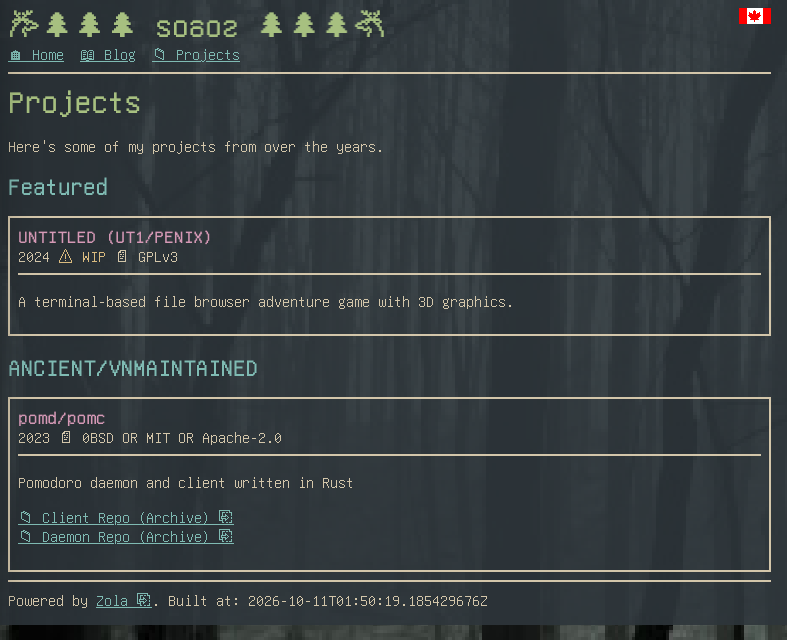
Zola template usage is familiar to anyone who uses JSX. With this, I can finally see my projects:
Related Blog Posts
Using zola's taxonomies feature, I can generate list pages for blog posts related to different projects. By adding projects to my posts' front matter, I can then link to related articles from within my project cards:
{% set blogprojects = get_taxonomy(kind="projects")["items"] %}
{% for blogproject in blogprojects %}
{% if blogproject["name"] == key %}
<li><a href="{{blogproject["path"]}}">📖 Related Blog Posts</a></li>
<ul class="no-bullets">
    {% for i in range(end=3) %}
    {% set current=blogproject["pages"] | nth(n=i) %}
    {% set next=blogproject["pages"] | nth(n=i+1) %}

    <li>{% if next != None %}├─{% else %}└─{% endif %} <a href="{{current.path}}">📃 {{current.title}}</a> - {{current.date}}</li>
    {% if next == None %}{%break%}{%endif%}
    {% endfor %}
</ul>
{% break %}
{% endif %}
{% endfor %}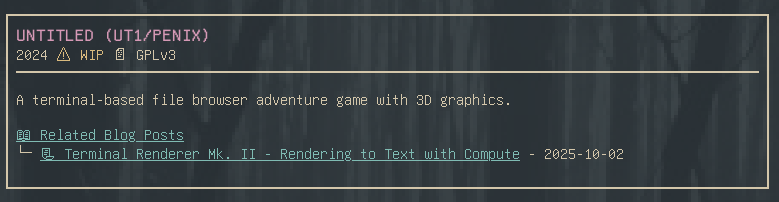
Now that I've gone and spent all this time setting up the projects infrastructure for this site, I have to actually go and migrate everything over haha. Hopefully I can stick with it this time.